AI摘要

本文提供子比主题首页顶部输出一言的美化教程,只需将文中提供的HTML及JS代码添加至子比主题设置“叠加搜索组件”上方的额外内容处,即可调用API实现一言展示。

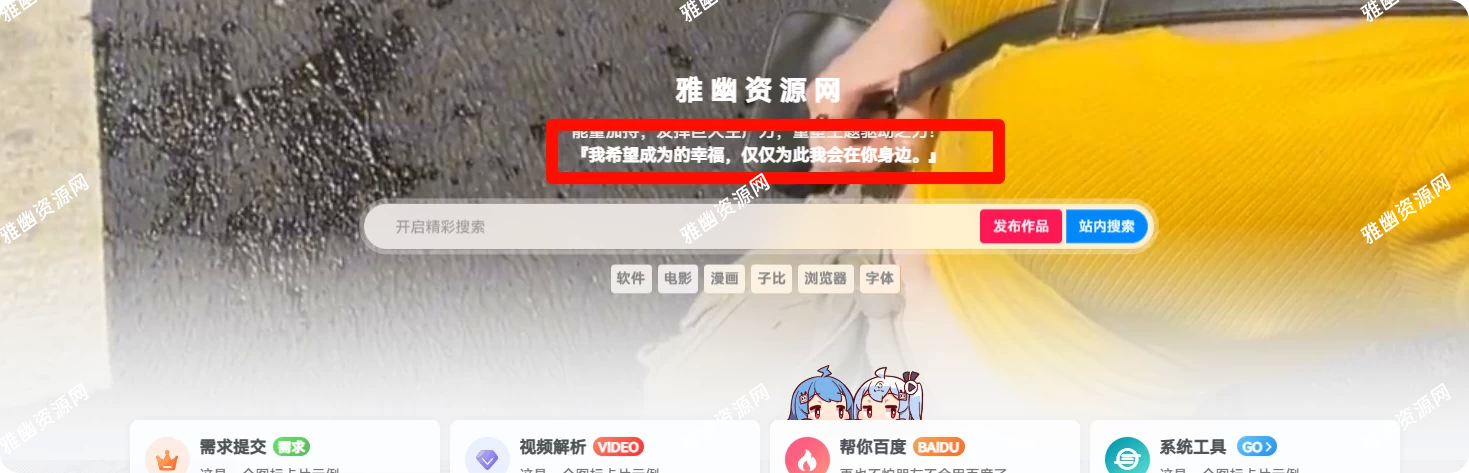
效果图

部署教程

把下面代码添加在子比主题设置 - 页面显示 - 顶部多功能组件 - 叠加搜索组件 - 组件【上方】添加额外内容

[hidecontent type="reply"]
<strong> 『 <span id="api-response"></span>』</strong>

<script>
    fetch('https://tenapi.cn/v2/yiyan') 
        .then(response => {
            if (!response.ok) {
                throw new Error('Network response was not ok');
            }
            return response.text();
        })
        .then(data => {
            const apiResponseElement = document.getElementById('api-response');
            apiResponseElement.textContent = data;
        })
        .catch(error => {
            console.error('Error fetching the API:', error);
            const apiResponseElement = document.getElementById('api-response');
            apiResponseElement.textContent = '抱歉,一言接口出小差了(˚ ˃̣̣̥᷄⌓˂̣̣̥᷅ )';
        });
</script>
[/hidecontent]