WordPress子比主题美化 文章列表右上角添加置顶+新文章发布ICON图标
AI摘要
WordPress子比主题文章发布后会在文章表右上角显示ICON图标,大多数网站都有这个美化,但是有很多不太一样的地方,今天分享给大家,右上角的角标大家可以根据自己的喜好进行更换。
效果图

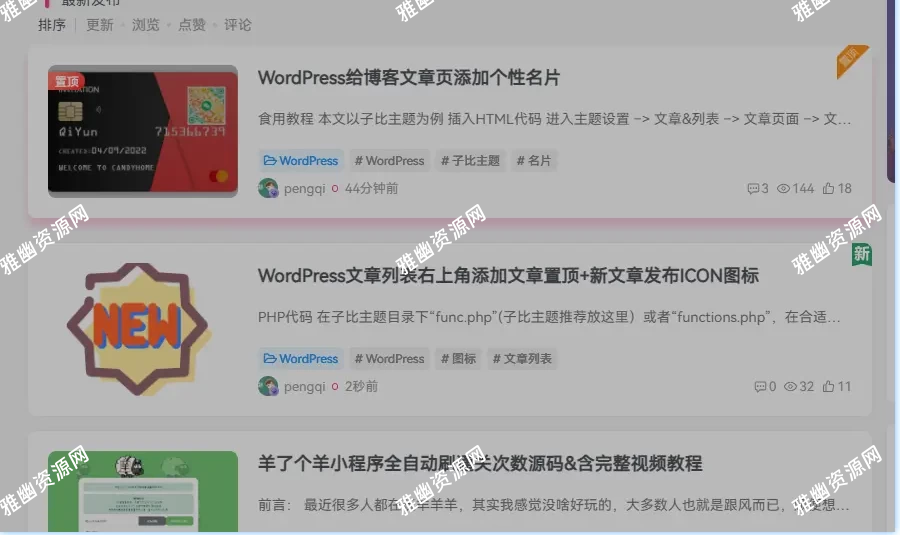
ICON图片可自由更换
部署方法
在子比主题目录下“func.php”(子比主题推荐放这里)或者“functions.php”,在合适位置放下面PHP代码。
上面图标链接自己修改
在子比主题目录下“/zibll/inc/functions/zib-posts-list.php”文件中,放在获取文章列表标题内,大概440行的文章放入下面PHP代码(如图)
或者搜索
获取文章列表的标题$html .= tianyishangke_post_newicon($post);//置顶文章icon图标函数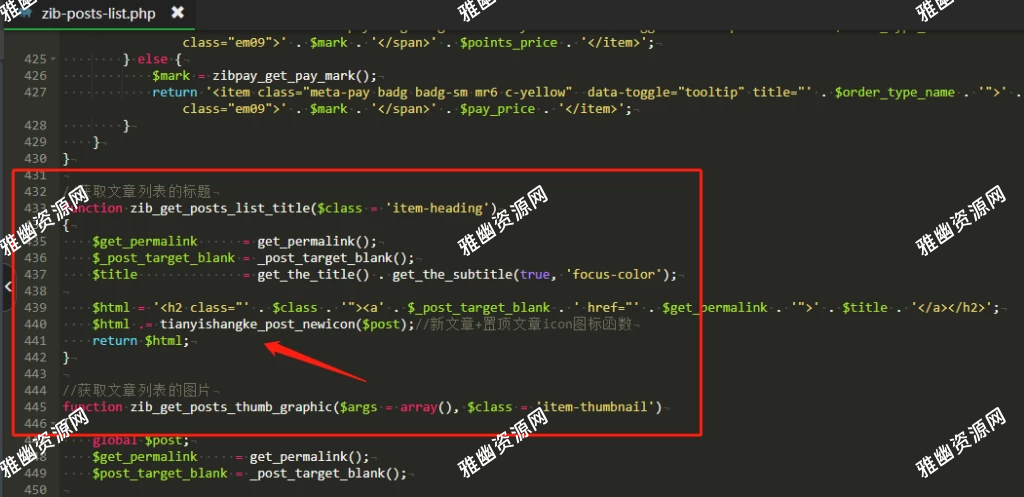
CSS代码
/*新文章发布图标样式*/
.posts-item{position: relative !important;}
.tianyishangke-new-icon{position: absolute;height: 35px;right: 0;top: 0;}
.tianyishangke-new-icon img{-webkit-user-drag: none;}
版权声明:本文为原创文章,版权归 天凉好个秋 所有,转载请联系博主获得授权。
本文地址:https://beicb.top/archives/2365.html
如果对本文有什么问题或疑问都可以在评论区留言,我看到后会尽量解答。