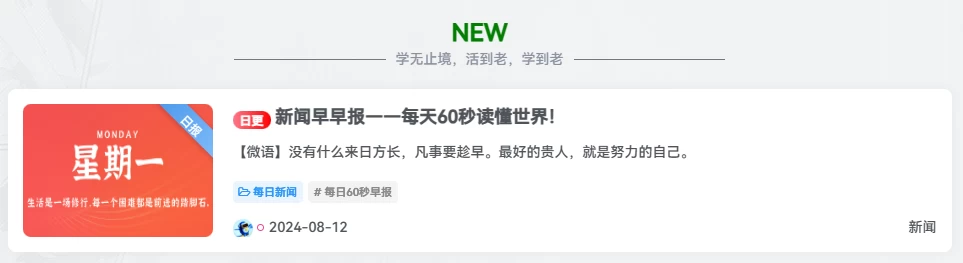
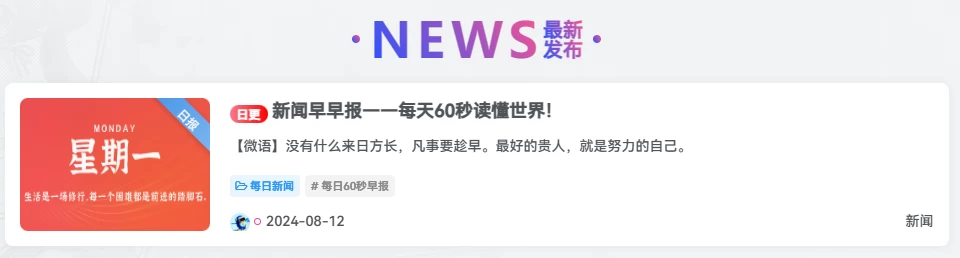
本文分享了两种为子比主题博客首页添加带“NEW最新发布”字样及分隔线效果的样式代码,只需在后台自定义HTML小工具中粘贴代码即可部署,第二种样式还支持将CSS外链引用以精简代码。
两种样式用于首页作为一些小组件的标题挺不错的。
效果图一:
代码部署:
外观-小工具-自定义HTML,复制进去就可以了。具体哪里看你们自己吧。CSS压缩了,看不懂的话就可以把CSS格式化回来。
[hidecontent type="logged"]
<div class="emoji-container">
    <div class="emoji-title">NEW</div>
    <div class="emoji-separator emoji-sub emoji-sm">学无止境,活到老,学到老</div>
</div>

<style>
    .emoji-container{display:flex;flex-direction:column;align-items:center;text-align:center}
    .emoji-separator:before,.emoji-separator:after{content:"";background:#777;flex:1;height:1px;margin:0 10px;max-width:16%}
    .emoji-separator{display:flex;align-items:center;justify-content:center;width:100%}
    .emoji-sub{color:#8c92a1!important}
    .emoji-sm{font-size:14px}
    .emoji-title{font-size:24px;font-weight:bold;color:green}
</style>
[/hidecontent] 效果图二:
代码部署:
在后台—外观—小工具—自定义 HTML— 选择你需要放的位置添加。
如果觉得代码太长,可以将下面的 css 样式中的首页最新发布标题里面 css 样式代码,复制下来,放到一个 css 文件当中再引用即可,
引用代码可参考我提供的,将/css/news.css 更改成你的文件路径就可以了
[hidecontent type="reply"]
<link rel='stylesheet' id='ripro_chlid_style-css' href='/css/news.css' type='text/css' media='all' />
<!--NEW 最新发布样式开始-->
<style type="text/css">
/*首页最新发布标题*/
.zhankr-zx {
  position: relative;
  margin-bottom: 18px;
  display: flex;
  -webkit-box-align: center;
  align-items: center;
  -webkit-box-pack: center;
  justify-content: center;
  line-height: 1;
}
.zhankr-zx:before {
  margin-right: 10px;
}
.zhankr-zx:after {
  margin-left: 10px
}
.zhankr-zx:before, .zhankr-zx:after {
  content: "";
  display: inline-block;
  width: 8px;
  height: 8px;
  background: linear-gradient(-125deg, #f95491 0%, #2953fd 100%);
  border-radius: 50%;
}
.zhankr-zx span {
  font-family: Futura;
  background: linear-gradient(-125deg, #f95491 0%, #2953fd 100%);
  -webkit-background-clip: text;
  color: transparent;
  font-size: 49px;
  letter-spacing: 5px;
  display: inline-block;
  font-weight: 700;
}
.zhankr-zx .zhankr-zx-n {
  font-size: 20px;
}
.zhankr-zx .zhankr-zx-n strong {
  display: block;
  font-size: 20px;
  background: linear-gradient(-125deg, #f95491 0%, #2953fd 100%);
  -webkit-background-clip: text;
  color: transparent;
}
.HhcatboxDes {
  position: absolute;
  opacity: 0;
  z-index: 1;
  align-items: center;
  display: flex;
  font-size: 16px;
  height: 180px;
  justify-content: center;
  width: 100%;
  color: #fff;
  font-weight: 600;
  background: #f95491;
  -webkit-transition: all 0.35s ease-in-out;
  -moz-transition: all 0.35s ease-in-out;
  transition: all 0.35s ease-in-out;
  -webkit-transform: translateY(100%);
  -webkit-transform: translateY(100%);
  -moz-transform: translateY(100%);
  -ms-transform: translateY(100%);
  -o-transform: translateY(100%);
  transform: translateY(100%);
}
.HhCooltitle {
  margin-top: 10px
  }
/*首页最新发布标题*/
</style>
<div class="zhankr-zx">
<span>NEWS</span>
<div class="zhankr-zx-n">
<strong>最新</strong>
<strong>发布</strong>
</div>
</div>
<script>document.querySelectorAll(".zhankr-zx")[0].parentNode.parentNode.style.cssText="background:#fff0;box-shadow:0 0 0";</script>
<!--blog.beicb.top NEW 最新发布样式结束-->
[/hidecontent]