本文介绍了子比主题首页分类动态标题的美化教程,只需在主题自定义CSS中部署提供的代码(全局版或首页版任选其一)并替换图片链接,配合Zibll文章列表小工具,即可轻松实现标题动态美化效果,提升网站吸引力。
探索子比主题美化技巧,通过自定义首页动态分类标题,让您的网站内容更加生动有序。无需复杂代码,简单几步即可打造独一无二的网站首页,吸引访客目光,提升用户留存率。
效果图
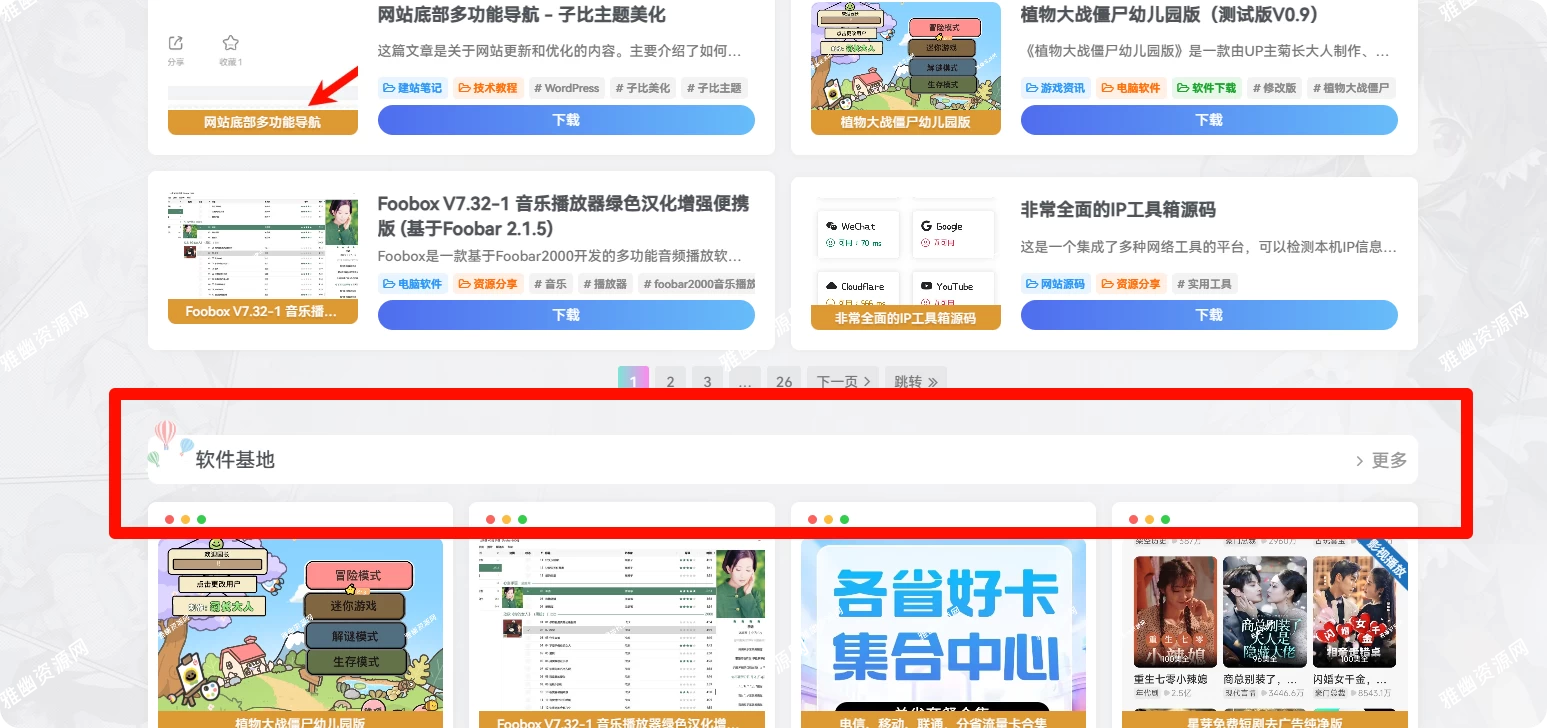
代码部署
首先这个美化需要子比的小工具,那就是:外观–>>小工具–>>Zibll 文章列表,如果用首页文章会没有的
直接将下面的代码放到后台 >> Zibll主题设置 >> 全局&功能 >> 自定义代码 >> 自定义CSS即可,然后图片链接输入你自己的动图即可!
[hidecontent type="reply"]
.box-body.notop {background: var(--main-bg-color);padding: 5px;padding-left: 1.2em;border-radius: 10px;margin-bottom: 10px;}.title-theme {position: relative;padding-left: 1.3em;font-size: 20px;margin: 5px;}.title-theme::before {content: '';top: -30px;width: 64px;height: 64px;left: -32px;background: url(图片链接);box-shadow: 0 0 black;background-size: cover;}.title-theme small {font-size: 60%;margin-left: 20px;}.title-theme .ml10::before {position: absolute;content: '';width: 1px;background: var(--theme-color);top: 30%;left: 115px;bottom: 16%;}
    body.home .box-body.notop {
        background: var(--main-bg-color);
        padding: 5px;
        padding-left: 1.2em;
        border-radius: 10px;
        margin-bottom: 10px;
    }

    body.home .title-theme {
        position: relative;
        padding-left: 1.3em;
        font-size: 20px;
        margin: 5px;
    }

    body.home .title-theme::before {
        content: '';
        top: -30px;
        width: 50px;
        height: 70px;
        left: -28px;
        background: url(图片链接地址);
        box-shadow: 0 0 black;
        background-size: cover;
    }

    body.home .title-theme small {
        font-size: 60%;
        margin-left: 20px;
    }

    body.home .title-theme .ml10::before {
        position: absolute;
        content: '';
        width: 1px;
        background: var(--theme-color);
        top: 30%;
        left: 115px;
        bottom: 16%;
    }
两个任选其一即可
style标签
<style>
</style>
[/hidecontent]