文章页面添加文章字数和阅读时间 - 子比主题美化
AI摘要
在文章顶部添加一个文章字数和阅读时间的提醒,也算在一定程度上美化了主题吧~
效果图


两种效果,二选一即可!!
部署流程
1、在主题目录下 functions.php 或 func.php 文件把下面的代码添加进去:
2、在主题目录 /zibll/inc/functions/zib-single.php,
搜索下方代码(大概在312行),
注意:子比版本:7.9,其他版本自测
<div class="article-content">把下方的代码放到搜索代码上方即可 (两张二选一)
默认样式
<!--文章字数和阅读时间-->
<i class="fa fa-hourglass-start"></i> <?php echo count_words_read_time(); ?>
蓝色字体
<span style="font-size: 18px; color: #00f; font-family: KaiTi"><?php echo count_words_read_time(); ?></span></p>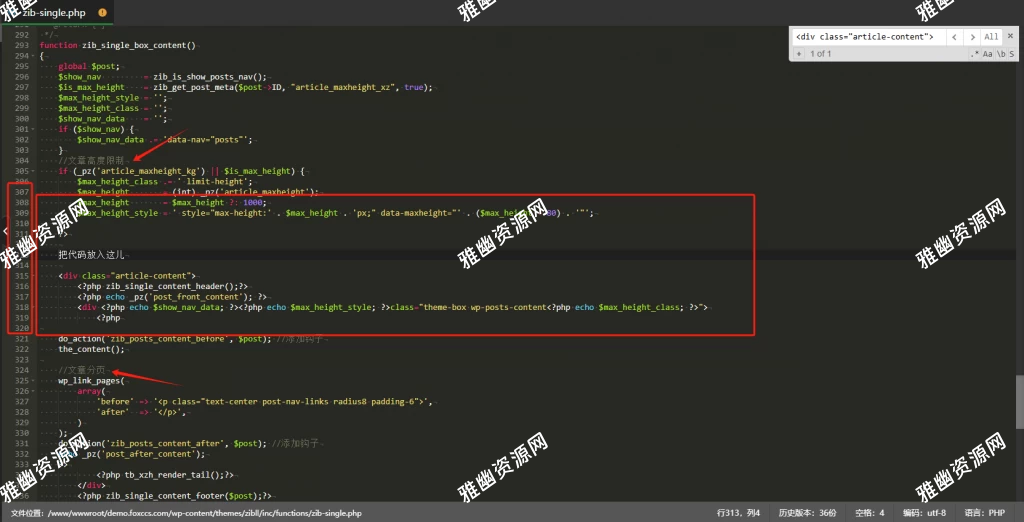
3、需要给子比后台设置的:图片封面关闭要不然不会显示(如图)
版权声明:本文为原创文章,版权归 天凉好个秋 所有,转载请联系博主获得授权。
本文地址:https://beicb.top/archives/809.html
如果对本文有什么问题或疑问都可以在评论区留言,我看到后会尽量解答。